
Sunset Theme for Chrome
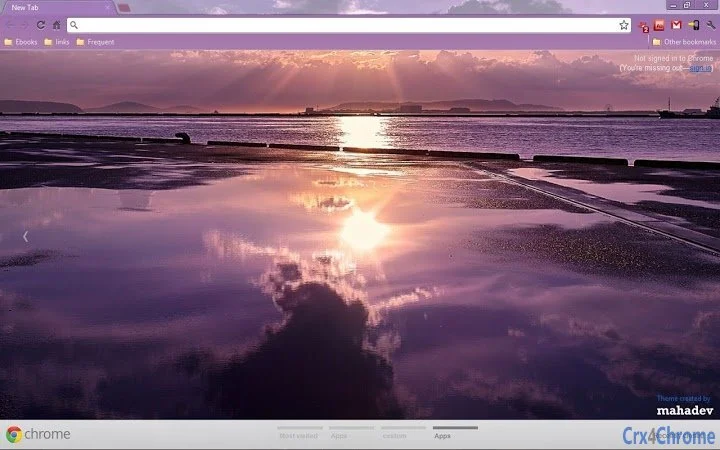
The Sunset Theme for Chrome is a desktop customization tool designed to enhance the visual experience of web browsing. It transforms the browser’s appearance with a serene, gradient sunset aesthetic, ideal for users seeking a calming and visually appealing interface. This theme is tailored for individuals who value personalization and aesthetic design in their digital workspace.
While the developer did not provide additional background information, the theme is part of a broader collection available through a dedicated blog and social media channels. Real-world usage scenarios include users who spend extended hours online and wish to reduce visual fatigue through soft, warm color transitions. It is also suitable for those who enjoy updating their browser’s look regularly to reflect seasonal or mood-based changes.
The theme integrates directly into Chrome’s theme system, requiring no additional setup beyond installation.
Key Features & Capabilities
- Sunset Visual Aesthetic – Features a gradient design inspired by natural sunsets, using warm hues such as orange, pink, and deep purple to create a soothing backdrop for the browser interface.
- Browser Integration – Seamlessly applies to Chrome’s default interface, including the toolbar, new tab page, and tab bar, ensuring a cohesive look across all elements.
- Minimal Performance Impact – Designed as a lightweight theme with no embedded scripts or animations, ensuring it does not affect browser speed or resource usage.
- Easy Installation – Available as a single file that can be applied directly through Chrome’s theme settings, requiring no complex configuration.
- Customization Focus – Offers a single, consistent visual style without altering core functionality, allowing users to maintain full control over their browsing experience.
Users can apply this theme to create a more immersive browsing environment, particularly during evening hours or when working in low-light conditions. The design is especially effective for those who prefer a soft, ambient interface that reduces eye strain. It is also ideal for digital artists, designers, or content creators who use their browser as a creative workspace and want a visually harmonious environment.
User Interface, Workflow & Performance
The user interface of the Sunset Theme is entirely dependent on Chrome’s built-in theme engine, meaning it does not introduce new UI elements or navigation structures. The workflow remains unchanged from standard Chrome usage, with the theme only affecting visual appearance. Users can switch themes at any time through Chrome’s settings without disrupting their browsing habits.
The theme does not include interactive components or dynamic effects, which contributes to a stable and predictable user experience. The developer did not specify resource usage details, but based on its file size of 1.2 MB and the nature of static visual themes, it is expected to have minimal impact on system performance. Stability is maintained through Chrome’s native theme handling, which ensures compatibility across supported platforms.
Compatibility & System Requirements
The Sunset Theme is compatible with Windows and Mac operating systems, as specified in the product details. It supports Chrome versions that are compatible with the theme system introduced in the browser’s early development stages. The installation size is 1.2 MB, which is typical for a single-theme file.
Exact system requirements were not listed, but compatibility is likely limited to systems capable of running Chrome. The theme does not require additional software or plugins, and no hardware specifications were provided. Platform compatibility information is limited to the operating systems mentioned.
Pros and Cons
Pros
- Visually appealing sunset-inspired design
- Lightweight and fast to install
- Minimal impact on browser performance
- Easy to switch or remove at any time
- Available at no cost
Cons
- No interactive or animated elements
- Single visual style with no variation options
- Outdated release date (2012) may affect compatibility with newer Chrome versions
- Developer support details not available
Is the Sunset Theme compatible with current Chrome versions?
Compatibility depends on the specific Chrome version in use. While the theme was released in 2012, it may still function on modern versions of Chrome, though official support is not guaranteed.
Can I use this theme offline?
Yes, once installed, the theme operates entirely offline and does not require an internet connection to function.
Is the Sunset Theme safe to download and install?
The theme is available from a known blog and social media channels. As it is a static visual file without executable code, it poses no known security risk. However, users should ensure they download from the official source.
Does the theme require a license or subscription?
No, the Sunset Theme is available for free and does not require any license or recurring payment.
How do I update or remove the theme?
Updates are not provided by the developer. To remove the theme, users can go to Chrome settings and reset the theme to default.
Final Thoughts
The Sunset Theme for Chrome remains a simple yet effective tool for users seeking a calming, visually rich browsing environment. Its lightweight design and straightforward installation make it accessible to all levels of users. While its release date suggests it may not support the latest Chrome updates, it continues to serve as a nostalgic and functional option for those who appreciate classic browser customization.
The theme is best suited for individuals who prioritize aesthetics over advanced features and want a free, no-frills way to personalize their browser. For those looking to enhance their digital workspace with a soft, warm visual style, this theme delivers on its core promise. Download Sunset Theme for Chrome now.







